A full, hands-on look at ContentPlan 30 — the AI-assisted Pinterest content planner that promises a ready-to-post pin for every day of the month. This review covers every feature, the real day-to-day workflow, full pricing, a sample pin walkthrough, and an honest verdict on who it's actually worth buying for.
If you have ever stared at a blank Pinterest scheduler on a Sunday night trying to figure out what to pin for the next 30 days, you already know the real problem with Pinterest marketing. It is not the platform — it is the daily grind of coming up with fresh pin ideas, writing descriptions that actually rank, designing a graphic, and keeping a consistent posting rhythm without burning out. Most people don't quit Pinterest because it doesn't work. They quit because the content treadmill becomes exhausting after week three.
That is exactly the gap ContentPlan 30 is built to fill. Instead of handing you a vague content calendar template or a list of "50 Pinterest niche ideas" that you still have to turn into actual pins, it generates a complete, individual pin for each day of the month — hook, pin graphic text, Pinterest title, description, call to action, alt text, and relevant search terms, all bundled together and ready to use. In this review, I'll walk through exactly what you get, how the workflow feels day to day, what a real generated pin looks like, what it costs, and who should — and probably shouldn't — buy it.
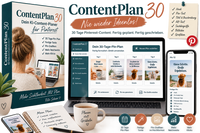
ContentPlan 30 is a Pinterest content planning tool built around one idea: a content plan should be something you can open and use immediately, not a pile of raw ideas you still have to shape into real pins yourself. For each day in a 30-day plan, the tool produces a fully worked pin package, including:
The tool is explicit about the tone it's going for: hooks are meant to spark genuine curiosity, not rely on false promises or clickbait tricks. That distinction matters more than it sounds — a huge share of "AI-generated" Pinterest content ends up sounding identical across accounts, which quietly kills engagement over time. Whether ContentPlan 30 always avoids that trap is something we'll come back to in the pros and cons section, but the intent behind the design is clear and worth noting for anyone tired of generic AI copy.
Most Pinterest content planning tools stop at topic suggestions. ContentPlan 30 goes further and writes the actual copy you'll use — hook, graphic text, title, and description are produced together, so there's minimal editing needed before you publish.
Entire 30-day plans can be saved and revisited later. If a plan performed well, you don't have to recreate the thinking from scratch — open it, copy the pins, tweak the wording, and reuse the structure for a new topic or season.
You're not locked into the first result. Any single pin inside a plan can be improved or regenerated on its own — useful when nine out of ten pins in a batch feel right and one just doesn't land.
From any pin in your plan, generate a portrait-format Pinterest graphic and download it as a PNG. Templates are intentionally simple, prioritizing readability over flashy design — which tends to perform better on Pinterest specifically.
The whole point is removing the daily "what do I post and how do I word it" decision, which is often the actual bottleneck for solo creators and small teams, not a lack of Pinterest knowledge.
Because relevant search terms are generated alongside every description, you're not left guessing at keywords after the fact — Pinterest SEO is considered from the first draft, not bolted on later.
Pick your niche or topic focus, and the tool begins generating a structured plan covering the full month, day by day.
Open a day to see the hook, title, description, call to action, alt text, search terms, and image idea all laid out together in one place.
Turn the pin's text into a portrait-format graphic using the built-in templates, then export it as a PNG ready for upload.
Regenerate or hand-edit individual pins that don't quite fit your brand voice before they go live — nothing is locked in permanently.
Post the pin through your usual Pinterest scheduler, and keep the saved plan on hand to revisit, repurpose, or adapt for a future month.
To make this review concrete rather than just descriptive, here's a simplified example of what a single day's output looks like in structure — a stand-in example built from the same package format ContentPlan 30 outputs for every day of a plan.
"The 5-minute habit that quietly fixed my mornings"
Based on how the tool is built, it's aimed squarely at:
It's a less natural fit for advanced Pinterest strategists who already have a tightly tuned content system and distinctive voice, or for anyone expecting the tool to handle strategy decisions like audience targeting, ad spend, or paid promotion — ContentPlan 30 focuses squarely on content creation, not campaign strategy or paid growth.
ContentPlan 30 is offered as a monthly subscription, with access managed through your personal online account. Here's exactly what's included at the entry tier:
Note: ContentPlan 30 is a support tool for content creation. It does not guarantee specific reach, click-through rates, sales, or revenue — results depend on your niche, audience, and how the pins are used.
To put that price in perspective, here's roughly how it stacks up against the time and cost of doing the same work manually or hiring it out:
Read through a full plan in one sitting rather than day-by-day — it's easier to spot repeated phrasing across pins.
If a hook feels off-brand, regenerate that single pin instead of manually rewriting it from scratch.
A single sentence in your own voice on the description helps pins feel less templated to regular followers.
Use Pinterest analytics alongside your plan to feed better topic choices into your next 30-day cycle.
A high-performing plan from last spring can often be lightly refreshed and reused the following year.
Resist the urge to overdesign — Pinterest tends to reward clear, readable pins over busy ones.
ContentPlan 30 doesn't try to replace your Pinterest strategy — it removes the one part of Pinterest marketing that quietly drains the most time: deciding what to post today.
For beginners and freelancers who need a repeatable system, and for creators who'd rather spend their time on their actual business than on daily pin ideation, ContentPlan 30 is a genuinely useful piece of the workflow. It's not a magic growth switch, and the Basic plan's monthly limits mean heavier users may eventually want more capacity — but as a way to stay consistent on Pinterest without the daily blank-page problem, it does what it sets out to do.
No. It's a content creation support tool. It can make producing consistent, well-structured pins easier, but reach, click-through rates, and sales depend on your niche, audience, and overall strategy.
Yes. Any individual pin inside a plan can be improved, regenerated, or manually edited before you publish it.
No. The graphic creation feature uses simple, ready-made templates specifically so pins stay clear and readable without needing design experience.
On the Basic plan, you're limited to 2 new 30-day plans and 10 additional AI actions per month. Existing content you've already created remains fully accessible, editable, and reusable.
No — you choose the topic or niche focus when starting a plan, so it can be pointed at whatever subject your Pinterest account covers.
Advanced Pinterest marketers with an already-optimized, highly personalized content system may find less added value, since the tool is aimed more at removing the daily content-planning workload for beginners, freelancers, and creators.
This page contains affiliate links, including links to ContentPlan 30. If you make a purchase through these links, I may earn a commission at no extra cost to you. This review reflects my own research and honest assessment of the product's features and pricing.